Alt text generator for nonprofits, schools and museums

AltTextLab accurately describes your whole media library in one run, then keeps up as your team publishes.

25 free credits monthly • No credit card required
Elementary students at a table with crayons and open books in an inclusive classroom.

Trusted by university web teams, museums and community nonprofits

MIT logoAfrican American Registry logoStony Brook University logoYMCA of the North logoCornell logoJoybound logoJ Los Angeles logo
Why it never gets finished

The mission is bigger than the team

Accessibility isn't the part anyone disagrees with. It's the part nobody has the hours for.

Decades of archive

Events, programmes, newsletters, staff photos, digitised collections. Nothing was described on the way in, and now there are thousands of images no one can get back through.

Hand-writing doesn't scale

Some institutions run real describing programmes, with staff time set aside and a house style guide. Even then, the described count is in the thousands while the library is in the tens of thousands.

Uploads outpace editors

Every event and every campaign adds more images than the team can caption. Whatever ground you make up, the backlog rebuilds itself.
Start free with 25 credits
Integrations

Works where you publish

Built for the systems institutions actually run.

CMS integrations

Developer Tools

PROCESS

Clear the backlog, then stay on top of it

Set it up once, run the library, then let new uploads take care of themselves.
Step 1 of 3

Install AltTextLab on your site

Add the plugin for your CMS and connect your account. Before it generates anything, AltTextLab shows you how many images are missing alt text, so you know the size of the job and what it costs.

No developer required
Supports JPG, PNG, SVG, AVIF, and WebP image formats
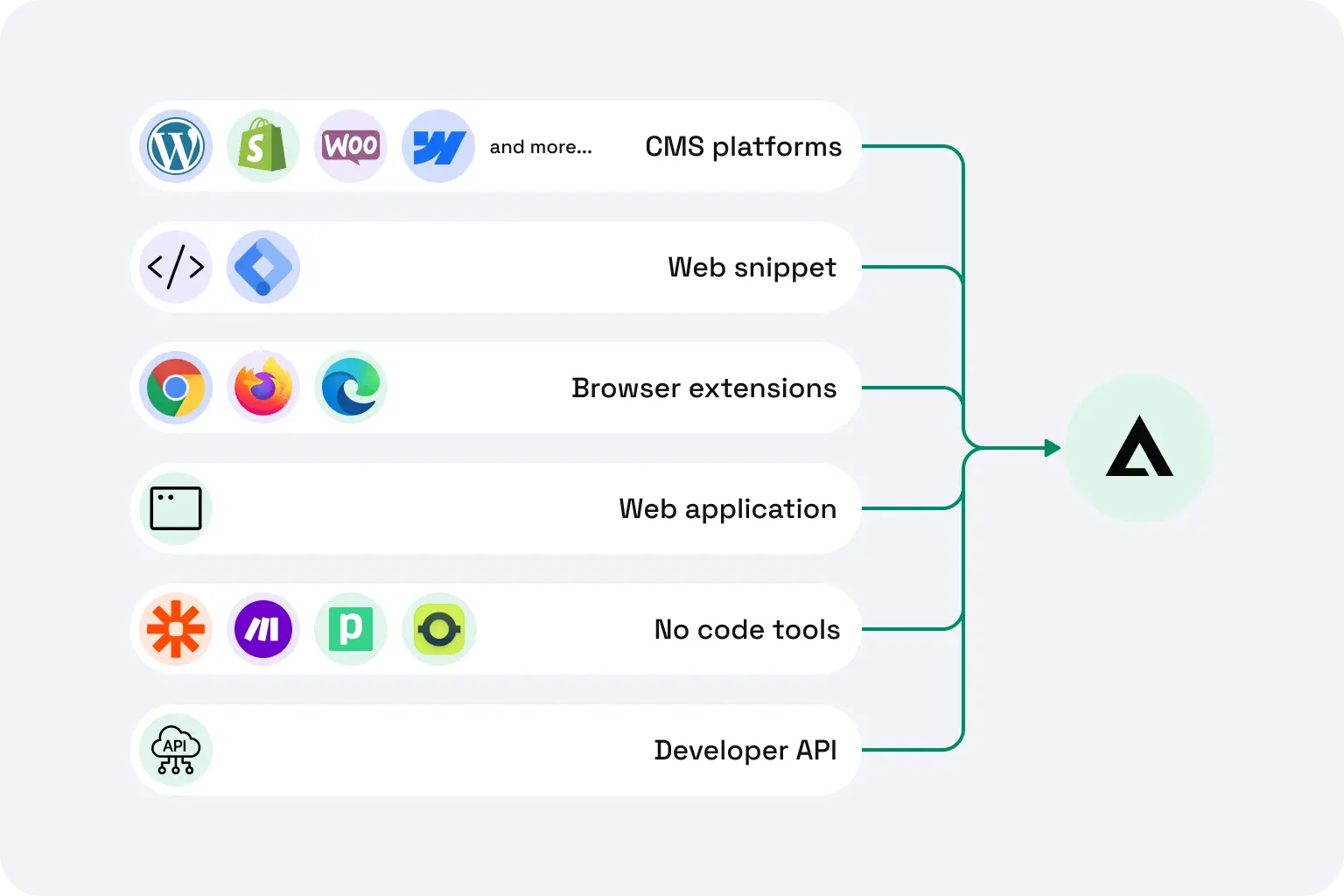
AltTextLab integration options: CMS plugins, web snippet, browser extensions, no-code tools, and REST API connected to a central hub.
AltTextLab platform capabilities overview with sample outdoor photo.
Step 2 of 3

Describe the library, then check what matters

Run bulk generation across your whole media library. Every description is yours to review from the generation history. Anything your team wrote by hand stays untouched, unless you switch the regeneration on deliberately.

Four writing styles, so the tone suits your collection
130+ languages for the communities you serve
Step 3 of 3

New uploads are covered automatically

From then on, images are described as they're uploaded. Nothing to remember, nothing to schedule, no backlog building up behind you.

Stays in place permanently, even if you uninstall
AltTextLab results panel showing generated alt text, SEO keywords, and writing style options ready to sync to CMS.
What's actually required

Cover every image on the site in one pass

No single tool makes an institution WCAG-compliant. But missing alt text is one of the most common failures, and the one you can clear across a whole site at once.
Start free
Written into your site's HTML, so audits and search engines actually see it — unlike overlay widgets layered on at runtime.
Reviewable after publishing. Sensitive and archival material can be checked and rewritten from the generation history.
WCAG 2.1 AA output on every image we generate, with the right length and detail for an auditor to accept.
Your images aren't stored or used to train AI models.
Testimonials

What web teams say

Rated 4.8 / 5 on G2
Smiling woman with dark hair and glasses, black-and-white portrait photo
Lynn Zawie · Director, Web Services
Stony Brook University · Verified on Trustpilot
Five-star rating
I tried a few others plugins before I found this one. The others were either too complicated or too expensive. This plugin was simple to use and install and worked immediately. The alt tags it generates are perfect. Very descriptive and accurate.
Close-up portrait of a woman with wavy auburn hair and green eyes
Julia R. · Marketing Manager
Software Development Company · Verified on G2
Five-star rating
It actually understands what's in images and creates spot-on descriptions. No more guessing what to write. The Chrome extension is super handy and fits right into my workflow. It's been a huge time-saver for my blog and product pages.
Smiling man with a dark moustache, headshot portrait
Caleb Stewart · Project Manager
Good Work · Verified on G2
Five-star rating
The software is easy to use, and the generated alt text is accurate! Additionally, the support team is very responsive and helpful. It was also easy to set up within our content management system.
Smiling woman with long dark hair, headshot portrait
Ana Koroliova · Head of Customer Service
Zorka.Agency · Verified on WordPress
Five-star rating
This plugin is absolutely worth installing. It runs fast, works seamlessly, and does exactly what it promises.
Young man smiling in an outdoor setting, casual headshot
Gleb V. · Web Developer
Web Development Agency · Verified on WordPress
Five-star rating
I manage several client sites and this plugin saves me a lot of time. I install it, set it up once, and it works in the background. It’s part of my standard setup now.
Woman with blonde hair wearing a plaid jacket, headshot portrait
Daria M. · Project Manager
Web Design Agency · Verified on WordPress
Five-star rating
I was able to generate alt text for thousands of images in just a few minutes, which saved me a lot of time compared to writing everything manually. AI descriptions are surprisingly accurate and understand the context of the image well. Setup was simple.
FAQ

Your questions, answered

Can't find what you need? Contact us →

Can AltTextLab handle several thousand images?

Yes. Bulk generation runs across your whole media library rather than image by image, and large libraries keep processing in the background.

What happens to the alt text our team already wrote?

Nothing. By default AltTextLab only fills images where alt text is empty or missing, so anything written by a describer, curator or editor stays exactly as it is. You can regenerate everything, but you have to switch that on deliberately.

Can we review descriptions before they go live?

Yes. Every description appears in the generation history, where it can be reviewed, edited or replaced — before or after publishing. For collections where wording matters, this is where a describer's judgement goes.

Our site isn't public. Can it still work?

On Drupal, yes. The module sends images directly rather than fetching them from a public URL, so it works on intranets, staging environments and sites behind a login. On other platforms, ask us before you sign up and we'll tell you honestly whether it will work.

Does this make our website ADA or WCAG compliant?

No, and no tool honestly can. WCAG 2.1 AA covers contrast, keyboard access, structure, forms and much more. What AltTextLab does is close one of the most common failures — missing image descriptions — across your whole site, in a form an auditor can verify.

Is there a nonprofit or education discount?

There's no separate discount program. Instead the free plan is permanent — 25 images a month, no card — and paid plans start at $5/month, with credits that roll over and never expire. If you have an unusually large archive, get in touch and we'll work something out.

We run several department sites. Do we pay for each one?

No. One account covers every domain your organisation runs, and credits are shared across all of them.

Can I pay once for a big archive job instead of subscribing?

Yes. Alongside the monthly plans there are one-off credit packs, so you can buy exactly enough credits to clear the archive in one run and stop there, with no subscription and nothing recurring to renew. One credit describes one image, and credits you've bought never expire, so a job spread over a few weeks isn't a problem.

How does it handle sensitive or archival imagery?

Carefully, and with you in control. AltTextLab describes what's visible in an image; it doesn't guess at identity, ethnicity or circumstances it can't see. Every alt textlands in the generation history for you to review, which is where a describer who knows the collection should have the final say. By default, anything your team wrote by hand is left untouched; regenerating existing descriptions is possible, but only if you turn it on deliberately. And your images aren't kept: they're processed to produce the description and then discarded, never stored and never used to train AI models.

See your images described in seconds

See how AltTextLab saves you hours and brings in search traffic.
Works with any store
WCAG-compliant output
Get started free